
How to use AI for wildlife photography
AI is here and there is no going back. Nor should we, because, AI can be a a very useful tool for wildlife photography. It cam help us capture images and it can also assist with administration.
AI generated image
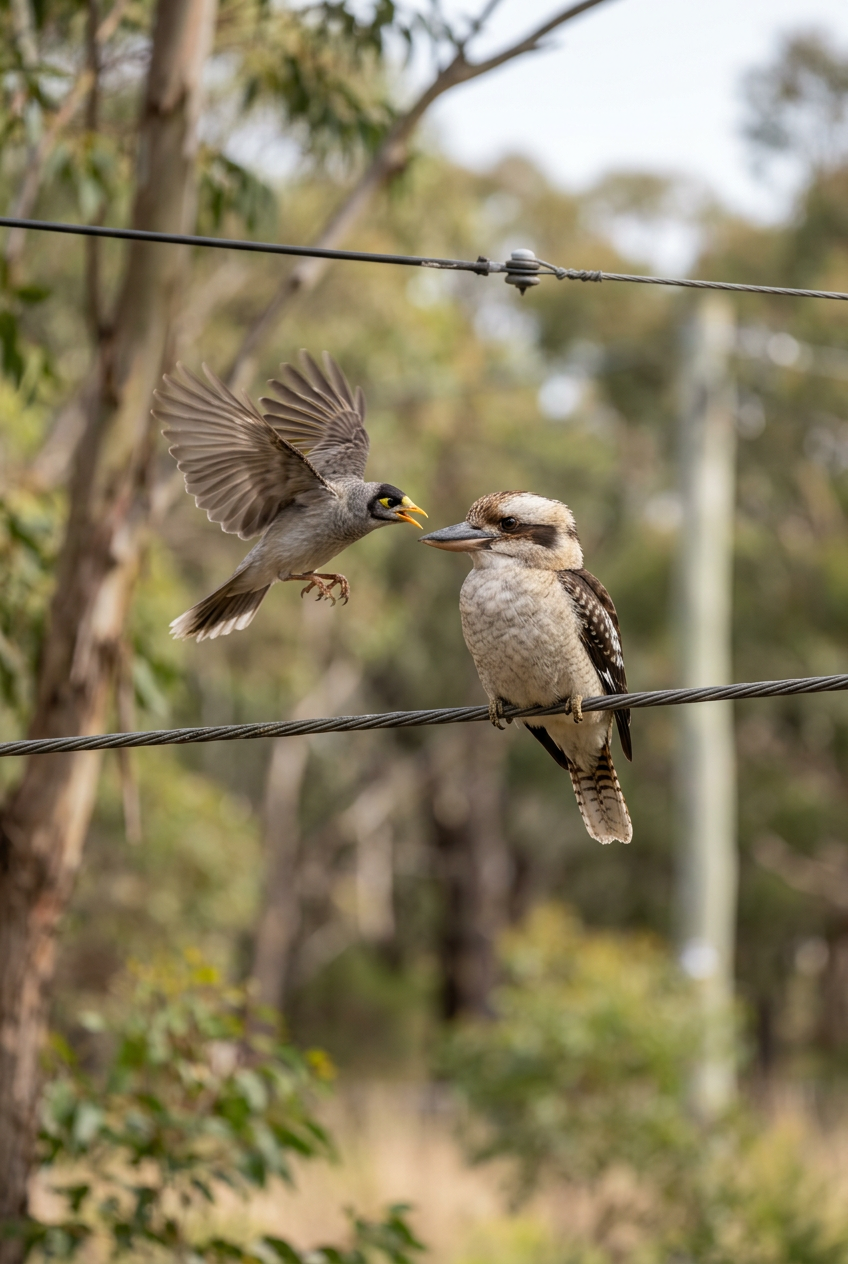
On the left is a photograph I took of a Noisy Miner harassing a Laughing Kookaburra in our backyard, while on the right is what Adobe Firefly created with the following prompt “Create a daylight picture with a mirrorless camera zoom lens at 500mm of a Laughing Kookaburra sitting on a wire, being harassed by a Noisy Miner that is flying at it.”
Introduction
Understandably, when most people think of photography and AI, they think about artificially generated images, such as the one above. That AI generated image came about because I was doing an online AI fluency course for my studies at the Canberra Institute of Technology, and I wondered how good Adobe Firefly was for generating wildlife images. I decided to use a photo that I had taken as a comparison, and chose an image from April 2026 of a Nosiy Miner trying to harass a Laughing Kookaburra. Under the image, I included the prompt that I used to generate it. The AI image isn’t bad and I suspect that if I posted it to Instagram, most people looking at it quickly on a smartphone screen wouldn’t think it was AI, and may even give it a like.
I wouldn’t be surprised if AI is already generating wildlife images. If a marketing campaign wanted a picture like the one above, I doubt that they would approach a wildlife photographer; how could the photographer guarantee to shoot an image like that given the variables of animal interactions and weather. The people after the image may do a search of stock images but the exact image may not be there, or they may not want to pay the license cost. AI would allow them to generate the exact image they want, at a fraction of the cost. However, that is a wildlife image, not wildlife photography.
An article in Nature discussed how AI generated images are already finding their way onto citizen science platforms like iNaturalist. These images can then skew the data, appearing to show a species where it has never been. While generating AI nature images or video may have a place in demonstrating how a species may act or how what they may look like in a habitat, responsible users will label those products with AI. However, that does not appear to be the case with some citizen scientist platforms, where AI generated images are being submitted as genuine photos.
Wildlife photography is about documenting the reality in front of the camera. A wildlife photographer is also an observer and every photograph will have a story behind it. The photograph may even show a unique example of animal behaviour. While AI may be able to replicate that image the person on the keyboard wasn’t there to see the behaviour and does not have the story. It is the narrative in the photo and the story behind the image that change a wildlife photo into wildlife photography.
However, AI is more than just generating an artificial image, it can be a useful tool for wildlife photography.
Editing
While editing is normally towards the end of the workflow, I thought that I would cover it quickly because most of the AI at this stage happens because the software developers included it in the programs that we use, such as Adobe Lightroom. That is, we photographers aren’t making a conscious decision to use AI, indeed we may not be aware that the program is using AI when it masks or reduces noise in an image.
I haven’t used any specific AI sharpening tools, I have only used Adobe Lightroom Classic’s (version 15.4.1) automatic de-noise feature. I find it very useful in removing noise and sharpening an image. I normally only use it when I have been forced to shoot at high ISO to take an image. Ideally, I try to properly capture the image in camera, which sometimes means using a high ISO. I normally don’t like the result because the image, even after denoising and sharpening, is not that sharp.
A win for AI is that the subject select in masking has improved for wildlife images in the latest release (version 15.4.1), where it seems to better understand the shape of wildlife. Previously, I often found myself using object select because it was better than the subject select but not so much with the current version of Lightroom Classic.
Generative AI allows photo editors to include things in images that won’t there when the image was taken, and I think that is probably stepping beyond wildlife photography. We have probably all removed a distracting twig or something similar from an image but I think there would be few wildlife photographers who would agree to add an element to an image that wasn’t there. Indeed, most wildlife photography competitions allow denoising and some minor distraction removals, but prohibit the inclusion of elements that were not in the original shot. That said, someone exploring the more artistic side of this genre, may feel it is perfectly fine to include extra elements in the final image, although those photographers would likely acknowledge those additions, rather than try to pass off the image as completely reflecting what the photographer saw.
The article in Nature that I referred to above, raised an issue with AI editing, where an AI editor is used to enhance a photo. The AI can introduce elements to the image that are not there, potentially even changing the image. The article showed an example of that where a basic prompt was given to make the image look better and Google Gemini made the image resemble a different bird. I would contend that most wildlife photographers would be more hands on with their photo editing, not asking AI to execute the whole process. However, AI can be used to help guide editing.
AI can help us learn a new editing style or aesthetic that we may have seen in another image. I am a big fan of Wes Anderson’s films and I thought it might be fun to process one of my assignment photos in his style. (If you are interested there is a book about how to photograph in a Wes Anderson style, Shoot Like Wes by Adam Woodward, and even an Instagram account, AccidentallyWesAnderson.) I asked an AI how to edit my image in a Wes Anderson style using Adobe Lightroom, and it gave me very thorough instructions that resulted in a close enough image for what I was after. You could use that for any photographer or style. The instructions would be a great starting point to help you understand how you might emulate that photographer.
Most search engines are AI-enabled these days, making their responses more comprehensive. Google’s reverse image search is a fantastic way to help identify animals quickly. I have found it very useful for insects, where my knowledge is still lacking. This can save a lot of time searching for a species identification. That said, AI is not always accurate, sometimes providing identifications from overseas, but even that can help to narrow down what genus or family the species is a part of.
The prompt
The following section covers the active use of AI, where the photographer is deliberately engaging with an AI model through providing prompts. Prompts, are the instructions to the AI for what the photographer wants the AI to do. Generally, it is good practice to be detailed with the prompt. Normally, AI will not refuse a prompt and will try to complete the task. If the photographer has not provided enough direction in the prompt the AI will look for patterns within its learning to generate an answer that seems logical based on those patterns, not necessarily logical based on the prompt. The AI probably won’t understand the broader context of a prompt, unless the photographer provides the context.
Think of AI as a keen and smart assistant, but you need to tell it clearly what the task is. This could be by using the who, what, where, when, why prompts or something similar. You may also want to give it an example, such as an image you have already taken, or you may want to direct it to where to find information, such as the Atlas of Living Australia to find species distribution information.
For work administration tasking, the AI Literacy Institute has created an AI prompt framework with the mnemonic of CREST, standing for:
Context - Give the AI the situation that you are dealing with - you have to write a risk management plan for a photoshoot that you are doing in a national park.
Role - What role should the AI write from - Write the plan from the perspective of the photographer.
Example - Provide an example of what you want done - This the attached risk management plan as an example.
Style - Indicate the style, such as friendly, directive, professional, etc - Use a professional style.
Task - Tell the AI exactly what needs to be done, think about using who, what, where, when, why - I want you to write a risk management plan for a wildlife photography shoot focusing on alpine dingos in the southern part of Namadgi National Park, south of the Gudgenby River, for 8 July, so that I can provide it to the National Parks service as part of an permit application.
Try to use AI as an assistant and not a replacement for work. The CIT AI Fluency course pointed out that the friction of researching a topic helps us learn and assists us in remembering. So, directing AI to summarise information on a species of animal and present it in a neat paragraph reduces that friction, and therefore reduces our learning about the wildlife that we photograph. Also, if we haven’t done some research as well, we may find it harder to spot an AI hallucination, that is, when AI makes up something. Hallucinations are a risk with AI, so doing some research will help in spotting them, it will also help to build our own knowledge on wildlife and help us write informed prompts.
Planning
AI is a great tool to help us plan a shoot. I often open several AI to assist - normally Google Gemini, OpenAI ChatGPT and Microsoft Copilot. I will paste the same prompt into each tool initially, and see where that takes me. An example of a prompt might be:
“In the month of July, using data from the Atlas of Living Australia and similar databases, tell me where would be the best locations for photographing dingoes within 100 km of Canberra. I will be using a Canon R5 and a 100-500mm zoom lens.”
In fact, this prompt helped me to take some nice shots of Alpine Dingos in Namadgi National Park, when I was testing out using AI.
When I was preparing this page, I asked an AI model, how it might help wildlife photographers and it suggested weather, by creating an accurate local forecast for the area. I’m not sure about the utility of that approach. In Australia, I would still go with the Bureau of Meteorology (BoM), and search for the location I am heading to. AI might be able to assist but it will still likely be accessing BoM data so it is probably best to go to the source.
AI can also provide suggested camera settings but I would be reluctant to place too much faith in these. AI is probably looking at the patterns in exif details or what people have been writing about their settings. I would defer to your own experience and the type of images that you are after. Although, there is nothing wrong to use those settings as a starting point if you are new to this area of photography.
Speaking about the images, AI can assist in visualising images. It could potentially create an AI image for you to help you plan for the shoot, although that effort may be limited unless you have a strong plan on how to ensure that a wild animal will cooperate. You could use AI to create a mood board of images of that species or from that area to help you think about how you might compose shots. As of July 2026, I would note that Google Gemini returned a good selection of dingo images for me to help understand how I might photograph the animal. However, Microsoft Copilot also included AI generated images, as well as computer graphics, and then created a mood board with completely unrelated graphics, mostly not even of animals.
AI can also assist with brain storming for shoots or projects. Have a discussion with it, but don’t just accept what it tells you. Walk away, think about it, do your own research and build on it. Good ideas normally become great ideas when we discuss them and develop them. AI can assist with that process.
Assisting with business
We all want to be out photographing more so using AI to help with business tasks will hopefully give us back time to photograph and to conduct other tasks beyond AI.
I can see why people like to use AI for editing, or even composing, correspondence and posts. I think AI can be a useful tool but I still prefer to do the work myself. I have tried using AI, but I think the generated text reads like AI, and I would rather have my own style. And that would be my main caution about using AI, especially for posts. You risk sounding unlike yourself and instead having an AI style that many other people have. We are not all going to be skilled writers but we won’t become better writers if we don’t keep practising the skill. AI can already write very well now, and in a few years it will probably be able to generate beautiful prose, as good as most professional writers. However, writing something ourselves helps us build our skills, and the end product reflects us. I think it is better to write the original item and use AI as a second pair of eyes, rather than have AI compose it from scratch.
Despite what I just wrote above, I am all for AI handling routine business documents that are often just things where we change dates and names, such as job quotes. However, make sure that you check the documents before you disseminate them. AI has made mistakes in the past, even with simple documents so to maintain a professional image, manage AI as you would an assistant. Give them a well defined task, then check the result once it is complete to ensure it is correct, and provide feedback to help the AI develop.
Since your website is already public, why not ask AI to check it. In fact, have several AI check your website to see what the various reviews write. You don’t have to accept the AI opinion but it can be another set of ‘eyes’ looking over your website. You could also request AI assistance in creating a portfolio - be careful about uploading images for this task because that will likely make them available for the AI to use for generating images for anybody. Consider carefully if you are comfortable with your images being used to train the AI model, and someone potentially creating an AI image based heavily on your genuine photograph.
Conclusion
AI is a great tool but in using it, be aware of what you are uploading and therefore how you are ‘feeding’ the AI model. Asking AI for feedback on photos means that you are uploading them to the AI for it to use for other tasks as well. Any data that you put in, is also now available to the AI model for its training and potentially accessible in any data leak. Make informed choices about what you put into the AI model so that you protect your copyright, your privacy and any other data that you want to keep confidential. We have to think consciously about how we want to use it.
Know when to use AI to write something and know when you have to use your own style. AI can be great for some tasks, especially mundane administrative tasks that don’t require much creativity, however, for when you are writing creatively, try to do it yourself. Develop and refine your own style, don’t let the items that you write end up reading like everybody else’s, just because you are using the same AI model.
There are broader ethical considerations related to AI over issues like copyright and who, if anybody, controls AI. Those issues are beyond the scope of a wildlife photographer, although it is useful to keep abreast of them for the impact they will have on AI development, and wider society.
AI is here and we need to know how to use it, otherwise we risk being left behind as photographers. Also, the AI that we are using now - July 2026 - is still an early generation, and it will only improve. We have to use it like another tool to help us take the best wildlife photographs that we can. Some people will use it to generate images, and some of those AI photos will potentially be used instead of our genuine photographs. However, as long as we are capturing photos that evoke emotion, our images will always have something an AI generated image won’t have, a story behind it. The story in the image and behind the image, is what will make genuine photographs important for the human viewer.